🚀 Overview
We’re thrilled to announce the release of DATAshaper 1.7.4, a major release that brings the data enrichment experience to the web, automates validation rule creation, and introduces a central validation hub.
Together these changes make DATAshaper faster to set up, easier to use, and more powerful at scale. Whether you’re a business user, data engineer, or project manager, this update brings something for everyone!
🌟 Highlights at a Glance
- DATAshaper Studio — Excel add-in power, now in your browser.
- Automatic Validation Rules — assign a field type, get a rule.
- AI Validation Hub — one connection, universal validation.
- Data Quality Quick Scan — from import to insight in under 10 minutes.
- Reworked Import — new connectors, data preview, better performance.
- Expanded Edit Fields — AI field profiling, template validation, grouped sections.
🌟 New Features & Major Improvements
- DATAshaper Studio
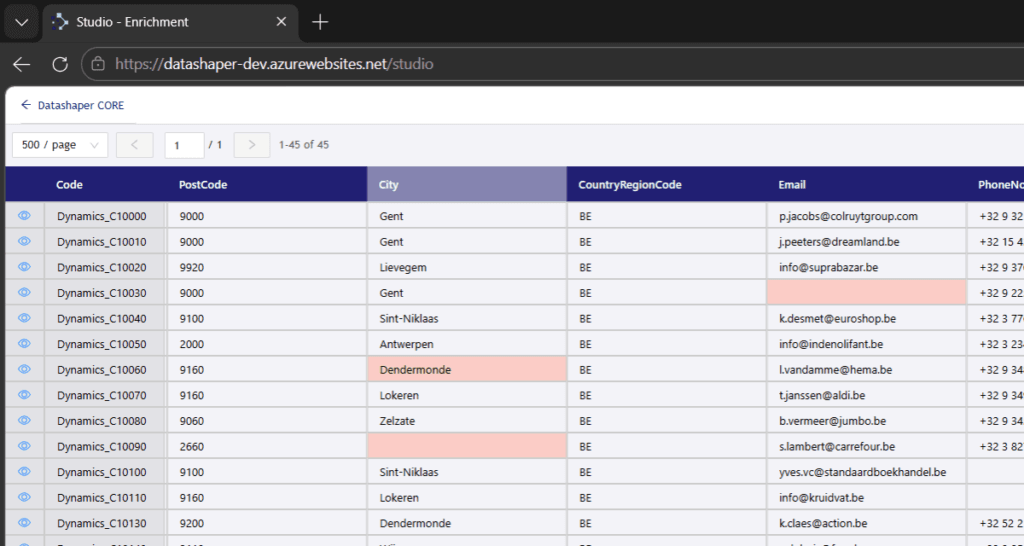
The familiar view, review, cleanse and enrich experience of the Excel add-in is now available directly in the web application. Cleaner interface. Better performance. No Excel required.- Web-based enrichment
Full enrichment, deduplication, and mapped-vs-enrichment views now render in-browser with server-side pagination for large datasets.
Issue list overlay on enrichment views with filtering options.
Single-record form view for detailed CRUD operations on individual records.
Field type validation directly in Studio views.
Row colouring per cluster group maintained in the web view.
Export to Excel with colours preserved. - Custom views and sharing
Save custom view definitions based on your field selection in the download screen.
Share views by URL so team members see exactly the same data layout.
Store and show update history on all table types, not just enrichment. - Unified user management
Excel add-in users and web users are now merged into a single user management space.
One source to maintain. Tight access controls remain in place.
Studio column shows the web page name for easy identification. - Filtering and performance
Pre-filter enrichment views on Owner and Who-to-Solve before download.
Option to hide technical columns for a cleaner working view.
Field labels added to filter and sorting dropdowns for clarity.
Significant download performance improvements for both Studio and Excel add-in. - Excel add-in improvements
The Excel add-in remains fully supported and benefits from this release too: improved performance on download and change detection, custom view creation from the download selection screen, field order adjustment and reordering support, update log for reference tables, and search tables in view management.
Fixed: pane disappearing when switching between Excel files, sorting after refresh, change detection when cell selection jumps to identical values.
- Automatic Validation Rules
Assign a field type and subtype in Table Set-up. DATAshaper generates the matching validation rule automatically. No manual rule creation needed for standard data quality checks.- How it works
When adding or updating fields, assign a Type (e.g. Country Code) and Subtype/Format (e.g. 2-digit ISO). The system references Mapping.Types → Mapping.Subtypes → [Validation].[ValidationRuleConfig] and creates a rule automatically based on the type + subtype combination.
Rules are visible in the Validation Rules screen and can be edited. When a user customises an automatic rule, it converts to a manual rule to preserve their changes. Rules can also be overridden at specific scope levels. - SQL formatting rules (built-in)
Email address format validation, bank account numbers (all formats per country), tax numbers (all formats per country), country codes (ISO), postal codes (per country), language codes, and currency codes. - Reference-based rules
Reference: validates against a custom query or reference table defined in table set-up.
Reference list: same as reference but allows multiple entries per field.
Both support @chrEnvironment and @Groupcode parameters. - External validation rules
Address validation via Google Validation API.
Tax number validation in the EU zone via VIES API.
More external providers will be added in future versions.
- AI Validation Hub
A central validation API that acts as a single connection point between your DATAshaper instance and external validation providers. Send data once, get validated results back — no need to repeat the same integration work on every project.- Architecture
Client DATAshaper sends a list of values (e.g. tax numbers) to the Hub. The Hub forwards the request to the appropriate provider (self-hosted or external API like VIES) and returns the validated response. Each client only needs a single connection to the Hub. - What’s live
Tax number validation (EU zone) via VIES, address validation via Google API, per-request token authentication for secure client identification, and configurable API endpoints from within DATAshaper application settings. - Technical details
Azure-hosted internal API endpoint with per-request token generation.
API supports three enrichment modes: per-issue, batching by column, and batching by rows.
Confidence scores added to LLM-based propositions.
Façade configuration managed via DATAshaper application parameters.
*The Hub will be expanded with additional validation providers in upcoming versions.
- Data Quality Quick Scan Mode
Need a fast data quality assessment? Quick Scan lets you import a dataset and drop it directly into validation. Get data quality insights in under 10 minutes.- How it works
Select Quick Scan mode when importing a new dataset. The system applies automatic validation rules based on detected field types. Review data quality results immediately — no configuration overhead. Ideal for initial assessments, demos, and quick audits. - Access control
Quick Scan is a separate user mode alongside Core and Studio. Administrators can grant Quick Scan access independently from other modules.
- Import Screen Rework
The import screen has been rebuilt. It now shows a data preview before import, handles large files better, and connects to new sources more easily.- New capabilities
Data preview before import — see your data before committing.
Significantly improved performance on large file imports.
Key field selection during import for all source types.
Recurring/scheduled data imports via batch processing.
Generic data source connector framework for easier integration of new sources. - New connectors
- Dynamics 365 via TDS (bulk import) — high-performance connection for large datasets
- Dynamics 365 via OData (Web API) — flexible connection for standard operations
- Existing supported sources migrated to the new generic connector framework
- Edit Fields Expanded
The Edit Fields screen in Table Set-up has been significantly expanded. It now supports AI-driven field profiling, new field properties for the upcoming AI layer, and validation of Excel templates.- AI field profiling
Automatic field type detection using AI — available both in Edit Fields overview and during the Import Wizard.
Confidence scores on AI suggestions so you know how certain the classification is. - Type and subtype system
Assign Type and Subtype directly in Edit Fields. Grouped sections with toggle visibility and scroll for better navigation. Type format naming standardised across the platform. - Field properties for AI
New field properties to prepare for the AI layer that allows users to talk to their data. AI metadata can be set at entity, table, and field level. Select which entities, tables, and fields to expose to AI and which to vectorise. - Excel template validation
Validation of Excel templates on upload so you know exactly what is wrong when an upload fails. Field group property added to the UI for better field organisation. Table info bar added to the Edit Fields top bar for quick context.
- Deduplication Improvements
Clustering has been renamed to Deduplication for clarity. Beyond the rename, this release brings performance gains, custom scopes, and smarter matching logic.- Performance
Native Jaro-Winkler function on SQL Server 2025 — same matching results, significantly faster execution. Automatic fallback to the custom function on earlier SQL Server versions. - Custom scopes
Cluster on custom selections within an entity instead of only on a single group code. Scope-specific rules: define different matching rules per scope. Scope selection available in Studio and Excel add-in.
Database table: [Deduplication].[Scope] - Matching logic
New option to ignore (neutralise) a field definition when one of the field values is blank or NULL — prevents blank fields from artificially lowering match scores.
Automatic validation rule for cluster records that still need a decision. Improved field definition processing order. - Other
Deduplication now available on all table types, not just specific ones — expands the use cases beyond traditional master data.
- DATAshaper AI Foundations
This release lays the groundwork for AI-driven features across the platform. These foundations prepare DATAshaper for a future where users can interact with their data through natural language.- AI metadata properties on entities, tables, and fields — control what AI can access
- Select which data to expose to AI and which to vectorise
- Confidence scores on all LLM-generated propositions
- Value matching model for automated translations
- LLM integration documented for future extensibility
🛠 Other Enhancements & Fixes
- Batch Processing: Real-time logging to track progress of a running batch. Improved stability: fixed issues where tasks got stuck, crashed on edit, or completed after being cancelled.
EntityId can now be used when creating new tasks. - User Management & Security: Three distinct user modes — Core, Studio, and Quick Scan — each grantable independently per user. New option to set security on specific screens for fine-grained access control.
- Application Settings: Expanded use of application parameters to remember project preferences across releases. New status page showing health of all DATAshaper components.
- Validation Mapping: AI-powered automap, group code-specific overrides, expanded join field width, and custom default mappings support.
- Migration Rules: Redesigned screen with improved layout, server-side pagination on rule results, and updated naming on the Final Review screen.
- Utilities & Technical:
- Updated all frontend and backend packages to latest versions
- Replaced deprecated EPPlus.Core package
- Migrated away from react-scripts to modern build tooling
- Reviewed and optimised use of logging procedures; reduced debug logging output when bitDebug is disabled
- Documented deployment procedure, testing approach, and LLM integration approach
- WIKI integration fixed on test and release environments
🐞 Bug Fixes (Highlights)
- Processing: Fixed extraction failures on certain datasets, loadfile processing delta loads, loadfile publish doing nothing, and validation on
nvarchar(max) fields defined as nvarchar(-1). - User Interface: Fixed table overflow on various screens, table set-up freeze after loadfile creation, crashes when reordering fields, drag-and-drop not accounting for system fields, and numerous small UI bugs across screens.
- Validation: Fixed validation rules copy/delete button behaviour, mismatch between edit rule drawer and overview table naming, issue value not carried over to the test screen, and ambiguous column error when filtering on Code in enrichment view.
- Excel Add-in & Studio: Fixed mapped vs enrichment updates, column showing as updatable instead of read-only, pane disappearing when switching Excel files, connection loss after a few minutes, and row colouring per cluster broken.
- Authentication & Security: Fixed Azure AD admin account unable to access screens, crash when opening user management, users unable to change their password, and Studio/add-in data accessible without authentication.
- AI & Mapping: Fixed legacy AI mapping errors on specific customers, automap with AI generating errors, AI not recognising source system, and AI mapping comment not removed when user changes the mapping.
- Import: Fixed XLSX import failures, import not showing success status, and failed imports on certain file formats.
📝 Known Issues & Recommendations
- SharePoint Source Support
The current SharePoint integration is outdated and does not follow security best practices. We recommend against using this functionality until an improved solution is released. - Deduplication Scope UI
Custom scopes for deduplication are currently database-only ([Deduplication].[Scope]). A full UI for scope management is planned for an upcoming release. - Quick Scan Limitations
Quick Scan mode relies on automatic type detection. For complex or non-standard data formats, manual type assignment after scan may still be needed for full validation coverage.